How to Use Amazon and Other Gift Cards for Purchases
In today’s digital age, online shopping has become a prevalent part of our daily lives. Among the many online retailers, Amazon stands out as a leading e-commerce giant, offering a wide array of products ranging from electronics to groceries. A convenient way to shop on Amazon is by using gift cards. In this blog, we will guide you on how to use Amazon gift cards for payments, explore the use of other gift cards on the platform, and discuss which gift cards are accepted.
Using Amazon Gift Cards for Payment
Redeem Your Amazon Gift Card
The first step to using your Amazon gift card is to redeem it. Follow these simple steps:
- Log in to Your Amazon Account:If you don’t have an account, create one.
- Go to Your Account:Click on “Account & Lists” at the top right corner of the Amazon homepage.
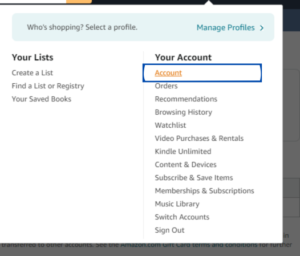
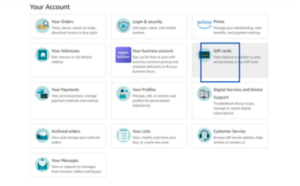
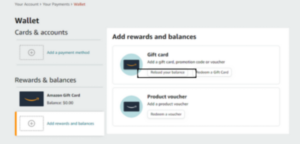
- Select “Gift cards”:Under the “Your Payments” section, click on “Manage gift card balance.”
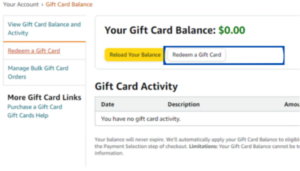
- Redeem a Gift Card:Click on “Redeem a Gift Card” and enter the claim code from your gift card. The amount will be added to your Amazon balance.
Use Your Amazon Gift Card Balance
Once your gift card is redeemed, it becomes part of your Amazon balance. When you’re ready to make a purchase:
- Add Items to Your Cart:Browse through Amazon and add your desired items to your shopping cart.
- Proceed to Checkout:When you’re ready to pay, click on the cart icon and select “Proceed to checkout.”
- Select Payment Method:During the checkout process, you can choose to use your Amazon balance. If your balance covers the full amount, it will be automatically applied. If not, you can combine it with another payment method, such as a credit card.
Using Other Gift Cards for Purchases on Amazon
Amazon directly accepts its own gift cards and Visa/MasterCard gift cards, it does not accept gift cards from other retailers directly. However, You can use PayPal and AMEX gift cards to make purchases on Amazon by following these steps.
- Check the Balance:Ensure your PayPal or AMEX gift card has sufficient funds.
- Add to Payment Methods: Log in to your Amazon account, go to “Your Payments,” and add the gift card as a new payment method.
- Use at Checkout: During checkout, Enter the balance on your PayPal or AMEXgift card in the “Other” section. If the balance is insufficient, you can combine it with another payment method.
Conclusion
Using Amazon gift cards is a straightforward process that adds convenience to your shopping experience. By redeeming your gift card balance and knowing how to use other gift cards, you can maximize your purchasing power on Amazon.Of course, if you have extra Amazon gift cards, you can exchange them for cash on CardNigeria, giving you more flexibility to enjoy shopping both online and offline. Happy shopping!