How to Buy Games on Steam with a Steam Gift Card
Whether you’re a seasoned gamer or just getting started, one thing is certain—Steam is the ultimate gaming hub. With thousands of games to choose from, it’s easy to get lost in a world of epic adventures, action-packed missions, and challenging puzzles. But to truly dive into the gaming experience, you need funds in your Steam wallet. That’s where the Steam Gift Card comes in!
In this blog, we’ll show you how to use your Steam Gift Card to buy your favorite games, and how you can easily exchange unused Steam gift cards for cash on CardNigeria.
What Is a Steam Gift Card?
Before we dive into the process, let’s make sure we’re on the same page. A Steam Gift Card is a prepaid card that allows you to load credit into your Steam account. The card’s value can range from small amounts to larger sums, and it’s an excellent way to add funds to your Steam wallet if you want to buy games, software, or other content available on the platform.
You can easily find these gift cards at local retailers, online stores, and platforms like CardNigeria. But how exactly do you redeem your card and start playing? Let’s take a look!
Redeeming Your Steam Gift Card
Redeeming a Steam Gift Card is quick and easy! Here’s how you can do it:
- Log Into Your Steam Account
- Click your username in the top-right corner and select “Account Details”.
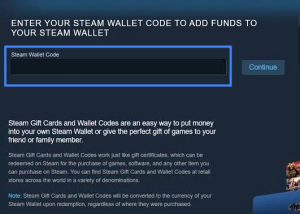
- Choose the option to “Redeem a Steam Gift Card or Wallet Code”.
Select“Redeem a Steam Wallet Code” - Click“Continue”
Buying Games on Steam Using Your Steam Gift Card
Once your Steam Wallet is funded, you can browse the massive collection of games on Steam. Here’s how to purchase your next game:
- Browse Steam’s Game Library
Explore genres, check out recommendations, or search for your favorite titles in the Steam store. Steam has everything from indie gems to AAA blockbusters! - Select a Game
Once you’ve found the game you want, click on it to view its details. Check the price, system requirements, and reviews to make sure it’s a good fit for you. - Click “Add to Cart”
If you’re ready to buy, click “Add to Cart” and proceed to the checkout page. - Choose “Steam Wallet” as Your Payment Method
During the checkout process, choose your Steam Wallet as the payment method. If you have enough funds, the total cost will be deducted from your wallet balance. - Complete the Purchase
After confirming your payment, Steam will instantly add the game to your library. You can now download and play your new game!
What If You Have Extra Steam Gift Cards?
Let’s be real—sometimes you end up with unused Steam Gift Cards sitting in your wallet. Maybe you’re done buying games for now, or you’ve accumulated too many cards. Instead of letting them gather dust, why not turn them into cash?
That’s where CardNigeria comes in! At CardNigeria, you can easily sell your unused or unwanted Steam Gift Cards. Our platform offers competitive rates and a smooth, secure transaction process. All you need to do is:
- Visit CardNigeria:Go to the CardNigeria website and navigate to the sell gift cards section.
- Check the rate: Once you’re on our website, feel free to check the rate through the Rate Calculator.
- Ready to sell: When you’re ready to checkout, click the “Sell Now!” You’ll be assisted by our official staff through WhatsApp who will provide 1 on 1 service to answer your questions and help you to complete your card trading.
- Receive Payment:you’ll receive payment directly into your preferred account.
Final Thoughts: Enjoy Your Games and Make the Most of Your Gift Cards!
Now you’re all set to enhance your Steam gaming experience with a Steam Gift Card! Whether you’re buying your next big game or using the funds to explore new content, Steam Gift Cards are the way to go. And don’t forget, if you’ve got unused Steam Gift Cards, CardNigeria makes it easy to sell them for cash.
Ready to start? Head over to CardNigeria.com and turn those unused gift cards into real value today!