Common Razer Gold Gift Card Errors and How to Fix Them
Razer Gold gift cards are popular among gamers, providing a way to access exclusive in-game content, skins, and more. However, sometimes users encounter issues when redeeming these cards. If you’re one of the many Nigerians facing Razer Gold gift card errors, don’t worry! Here, we’ll explore the most common problems and guide you through easy fixes.
Razer Gold Gift Card Error Messages
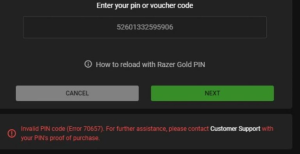
1. Invalid Card Code Error
One of the most frequent errors users encounter is the “Invalid Card Code” message. This error typically means that the code you’re entering doesn’t match the one stored on Razer’s system.
How to Fix It:
- Double-check the Code: Sometimes a simple typo can lead to this error. Ensure that you’ve entered all characters correctly.
- Watch for Similar Characters: Certain characters, like the letter “O” and the number “0” or “I” and “1,” can look similar. Double-check for these common mistakes.
- Try a Different Device or Browser: Occasionally, browser issues can cause an error. Switching devices or clearing your cache might help.
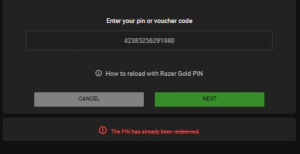
2. Expired or Already Redeemed Code
If you see a message indicating that the code is expired or has already been redeemed, the card may have been used or its activation period may have ended.
How to Fix It:
- Check the Expiry Date: If you bought the card a while ago, it might be past its valid redemption date.
- Contact the Seller: If you purchased the card recently but receive an “already redeemed” message, reach out to the seller for assistance. Sometimes, errors occur during the activation process.
- Reach Out to Razer Support: Razer’s support team can help verify if the card has already been redeemed and may offer additional options.
3. Region-Specific Errors
Razer Gold gift cards are region-locked, meaning that some cards can only be redeemed in specific countries. If you’re in Nigeria and try to redeem a card that’s locked to another region, you’ll likely see an error message.
How to Fix It:
- Purchase a Region-Compatible Card: Ensure that the card you buy is compatible with your country or region. Many retailers specify the regions for each card, so check carefully before purchasing.
- Use a VPN (With Caution): Some users try VPNs to change their location, but this might violate Razer’s terms of service and risk account suspension.
4. Server or Maintenance Issues
Sometimes, the Razer servers might be undergoing maintenance, or there may be a temporary service outage.
How to Fix It:
- Wait and Try Again Later: Maintenance usually doesn’t last long. Wait for a few hours, then try redeeming the card again.
- Check Razer’s Social Media: Razer often posts updates about server maintenance or outages on their social media channels or website. It’s worth checking for official announcements.
5. Insufficient Account Balance Error
If you’re trying to make a purchase and encounter an “insufficient balance” error, this could mean that the card value isn’t enough to cover the purchase cost.
How to Fix It:
- Check the Card Balance: Verify the remaining balance on your Razer Gold card before making a purchase.
- Combine Multiple Gift Cards: Razer allows you to combine funds from different cards. You can top up your account with another card to make the full purchase.
Contacting Razer Support
Razer support is available 24/7 to help Razer users resolve their issues, which are associated with common Razer Gold gift card error messages.
1. When To Reach Out To Razer Support
You may have to contact Razer support if you receive error messages in the form of an expired error and not available in your region error. These error messages weigh beyond what you can resolve on your own, but you can be assured of the team’s solution when you contact them for assistance related to your Razer Gold gift card.
2. How To Reach Out To Razer Support
You can contact Razer support via email and dial the customer service phone. But it is best to send your queries to the support team in your mail as it is expected that the Razer support team addresses questions from many customers worldwide. Some of its customer service numbers are:
Call: 1-855-872-5233 (US)
Call: 1-760-448-8997 (US)
Call: 00800-25233758 (Europe)
Call: +65 6505 2188 (Singapore)
3. Razer Support Contact Options
There is a wide range of Razer support options that resolve varying queries. These supports include product support, warranty support, technical support, and RazerStore support.
So you can call the mobile numbers every week, chat with the online messenger, or the Razer community proffering solutions to your needs.
Final Thoughts
Razer Gold gift cards are a fantastic way to enjoy premium gaming content, but errors can sometimes get in the way. By following the above tips, you’ll be prepared to tackle any issues that come your way. Remember, if you’re unable to resolve an error on your own, Razer Support is there to help.
And if you ever have extra Razer Gold gift cards you’re not using, why let them sit idle? At CardNigeria, we offer a quick and reliable buyback service for Razer Gold and many other types of gift cards. Turn those unused cards into cash easily and securely—giving you more freedom to choose how you want to spend!